
Install the game and loader before adding the archive
Give it a separate game directory so the legacy profile does not share mods or settings with your current game. Launch vanilla once, close it, install the Forge client for Minecraft 1.12.2, then select that Forge installation in the launcher. Start Forge once with no added mods and reach its main menu. This sequence creates the directory structure and confirms that the game/loader combination starts before the character archive is involved. If the empty Forge profile already fails, correct that installation first; adding a different Jenny archive will not repair an unrelated loader failure.
Copy the intact file and open Creative inventory
Download one of the two Java archives, verify its complete SHA-256 and open the active Forge installation's game directory. Copy the JAR into mods without unzipping it. Do not install both legacy archives together because their metadata uses the same mod ID. Launch the same profile and open Mods to find the internal mod name/version; the archive labelled v1.9.0 identifies itself internally as 1.8.0. Then open a new Creative world and search the available character or item labels, including Allie and Lamp. If the entry is absent, return to profile and directory checks before reinstalling Minecraft or modifying a valuable world.
Installation steps
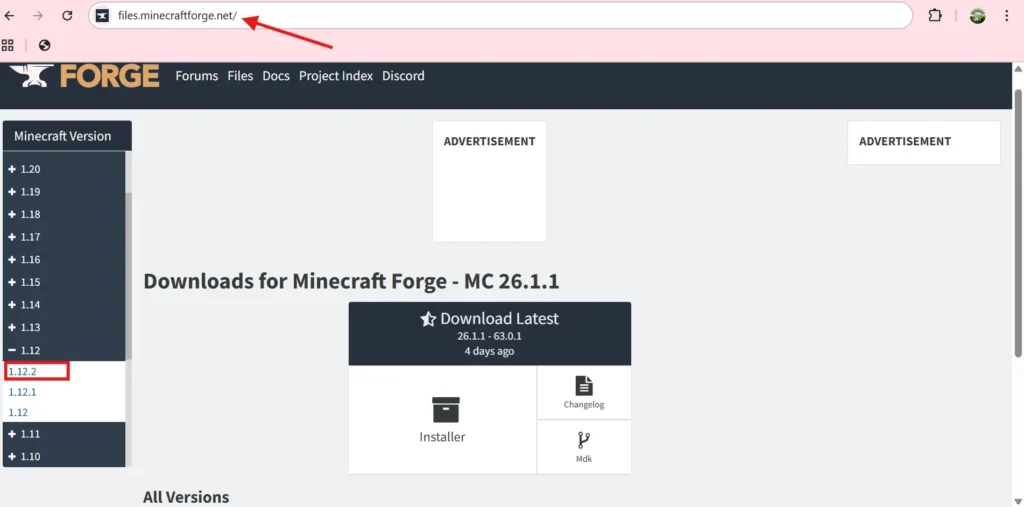
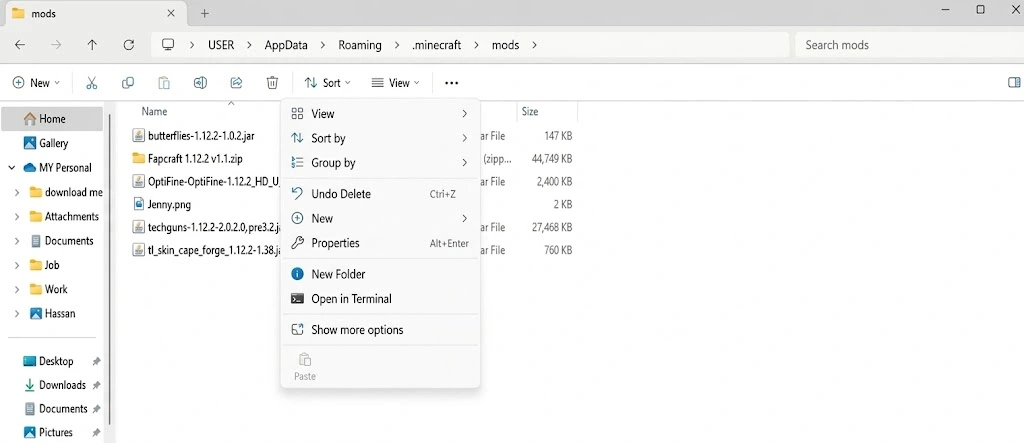
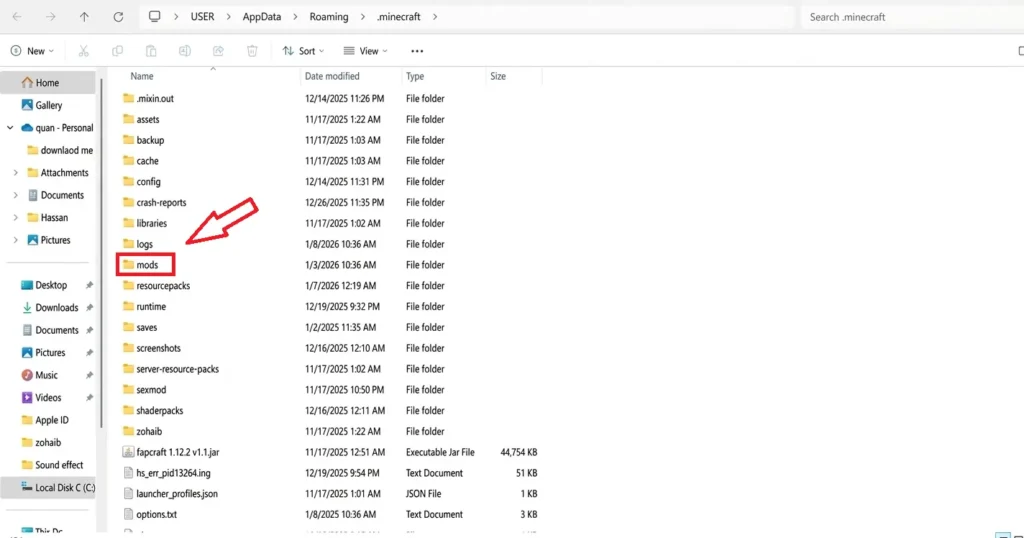
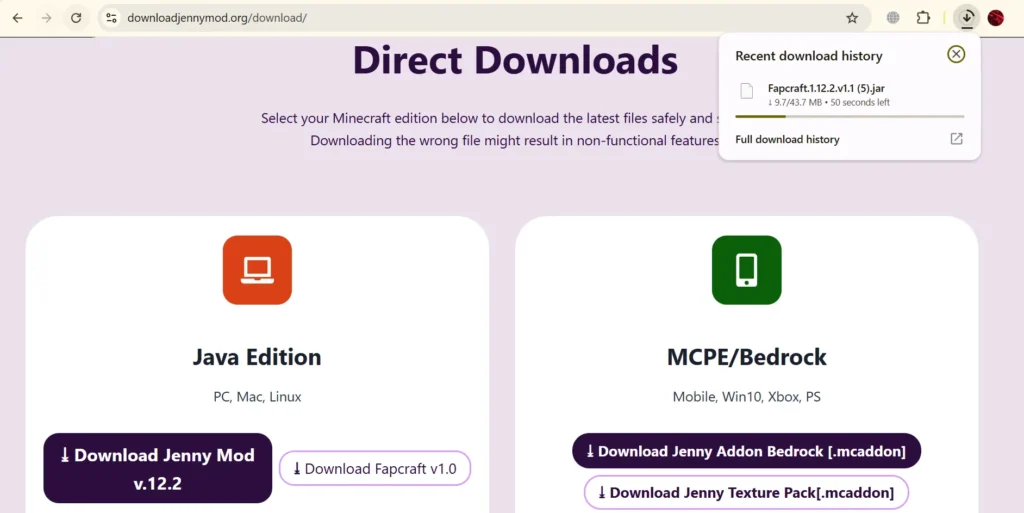
Select the legacy game installation
Open Installations in Minecraft Launcher, create a 1.12.2 installation, and give it a recognizable name. Use a separate directory if you also play a newer release.
Launch vanilla once
Start the selected game version and reach its menu, then close Minecraft. This populates the launcher files before Forge installs its profile.
Install the matching Forge client
Get the 1.12.2 installer from the official Forge downloads page, choose client installation, and select the new Forge entry in your launcher.
Start the empty Forge profile
Reach the Forge menu before adding the archive. If this empty profile fails, correct the loader/runtime installation first instead of mixing in more mods.
Verify one archive
Choose either Java download in the registry and compare its complete SHA-256. Keep its filename and JAR extension intact after the download finishes.
Open the active game directory
Use the Forge installation settings to find Game Directory. Open mods inside that directory, not a similarly named folder belonging to another launcher instance.
Copy the intact JAR
Place one legacy archive in mods and leave it compressed. Both approved Java archives use the same mod ID, so keep the alternative in another profile.
Use Mods and Creative inventory
Launch the same Forge profile, check its Mods entry, then open a new Creative world. Search the actual character and item labels available in that build.
Recover a misplaced file and keep the profile reusable
If you have already downloaded the JAR, you do not need another copy just because the mod is missing. Close Minecraft, open the Forge installation's directory from the launcher and inspect its mods folder. Make sure the file is directly inside that folder rather than inside an extra downloaded ZIP or a folder with the archive's name. Enable file extensions in the file manager if necessary. A file called something.jar.html or something.jar.zip may look convincing with extensions hidden but is not the intact selected JAR.
On Windows, avoid confusing Downloads with the active game directory. On macOS, use Finder's Go to Folder for the instance path when Library is hidden. On Linux, show hidden files when using the default .minecraft directory, or use the launcher's folder control for sandboxed installations. The launcher's custom directory overrides all default paths. You can keep a desktop shortcut to that specific folder once you have confirmed it, which makes later updates less confusing.
After the mod loads, give the installation a descriptive name such as the game version and selected variant. Keep its Java executable and memory settings attached to that profile. When updating, close the game and replace the selected archive instead of adding a second implementation beside it. Keep a copy of the previous archive outside mods if you want to return to it. To remove the mod, move it out while the game is closed; preserve worlds that use its entities with the original setup rather than treating removal as a harmless world conversion.
Use the launcher settings to finish the installation
In the official launcher, open the installation editor for the profile you intend to use. Select the installed Forge game version, assign the separate game directory and save the profile before pressing Play. If you have several nearly identical entries, give this one a clear name. Use its folder shortcut when copying the selected JAR so you do not rely on a remembered default path. When a third-party launcher manages instances, use its instance editor and mod-folder control for the same task.
If the Forge installer cannot find a base game installation, run the intended vanilla version through the launcher first, close it and retry the installer. Do not put the installer in mods. If the installer opens in a compression utility, check the Java association or use the appropriate installed Java runtime to run it. The mod archive itself does not need to be double-clicked. It remains intact for the loader to discover.
Once the profile loads, open Mods before entering a save. Check the selected internal name and version, then create the separate Creative world. Add other mods only after this stage. If a later addition causes the crash, return to the same working profile without that addition rather than repeating the entire Minecraft installation. Keep a backup of worlds used with custom entities before changing the content list.
1. Prepare a separate profile
In the Minecraft Launcher, create an installation for the required game version and run it once. A separate game directory keeps the test isolated from important worlds and unrelated mods.
2. Install matching Forge
Download Forge from its legitimate source and choose the build made for the exact Minecraft version. Complete the client installation, then select the new Forge profile in the launcher.
3. Add the mod file
Run the Forge profile once so its folders exist. Open its game directory, locate or create the mods folder and copy the intact compatible .jar into it. Do not rename it to another format or extract it.
4. Verify and test
- Launch the Forge profile.
- Check the Mods list for the expected entry.
- Create a separate world.
- Confirm the documented spawn method.
- If it fails, capture the exact error and latest log before changing files.
Choose your next step
Sources used for this guide
These primary references support the technical file, loader and package details on this page.
- GitHub: ZellRaihan/Jenny-Mod releasesgithub.com
- Minecraft Forge 1.12.x documentation: Getting Starteddocs.minecraftforge.net
- Minecraft Forge 1.12.x documentation: File and folder locationsdocs.minecraftforge.net
- Minecraft Forge: Minecraft 1.12.2 downloadsfiles.minecraftforge.net
- Prism Launcher: Downloading Modsprismlauncher.org
Frequently asked questions
Where is the mods folder?+
It is inside the game directory used by the selected launcher profile; a custom profile may not use the default .minecraft location.
Why does normal Minecraft launch without the mod?+
You likely opened the standard profile instead of the matching Forge profile.
What comes before copying the JAR?+
Launch the matching vanilla installation, install Forge, and reach the Forge menu without added mods.
Should I add shaders during the first launch?+
Start with the selected archive alone, then restore optional graphics additions after the profile works.
Which Java download should I copy?+
Choose one of the two registry JARs; they share a mod ID and belong in separate profiles.
Is a .mcpack a desktop Forge mod?+
No. It belongs to the Bedrock pack route even when downloaded on a desktop computer.
Why does double-clicking the character JAR not install it?+
The character archive is content that Forge discovers in the active instance, rather than the installer that creates the loader profile. Close any archive viewer, return to the completed download and copy that intact file into the selected installation’s mods directory. Then launch the same Forge entry and check Mods. A file association can make the operating system open JAR files with Java or a compression utility, but it does not select a Minecraft instance. Keep the Forge installer separate: that file has its own installation task. The approved character JAR remains unextracted so its classes and resources stay together for the loader.
How do I return to the previous Java variant?+
Close Minecraft and preserve a copy of the world before changing its content. Move the currently selected JAR out of the active mods directory and put the previous intact archive in its place. Keep one implementation of sexmod in that profile, since the two listed variants share that identity. Return to the same loader and game directory rather than creating another uncertain folder during the replacement. Use the world backup associated with the earlier setup if the save depends on changed content. Keeping each variant in a separate instance is easier when you intend to use both regularly; it preserves their configuration and saves independently.